Promoting blogs on social networking sites brings plenty of potential traffic to the website. It is one of the best ways to establish and grow your business. It is one of the best mediums to interact with new customers.
Nowadays, you will come across various types of social media platforms. Hence, will be a tedious task to manually share the blog posts.
You cannot take the Second Chance and ignore this because the internet is a hub for customers. Hence, it is important to improve your products’ exposure using multiple channels. Things can be more complicated for newbies.
Sharing content on social media is the best way to promote your product through a web blog or content. But, it may take a resource-intensive undertaking to implement and design a social sharing strategy.
You need not worry as there are plenty of methods and tools that automatically share WordPress posts.
Social Media Stats and Facts
Facebook is the biggest platform with 2.89 over billion users.
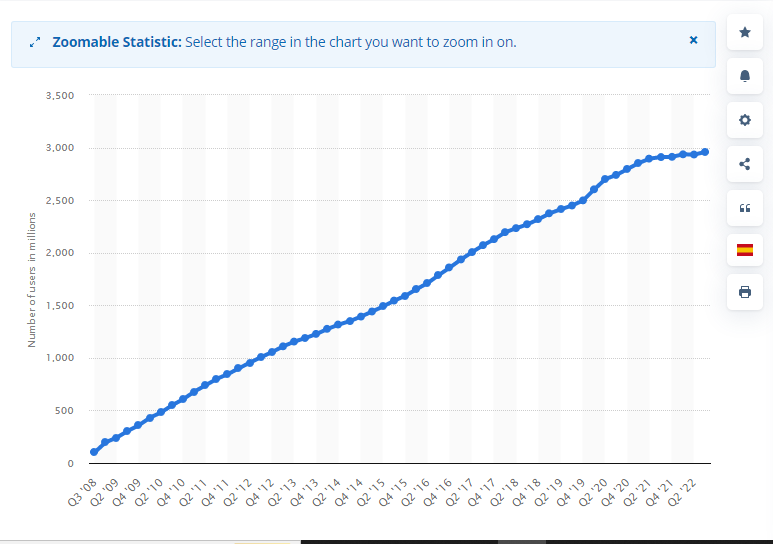
- Twitter, another leading giant has over 330 million active users.
- CNBC employees stated that the monthly users of Instagram are 2 billion.
- 444 million users actively surf on Pinterest.
These platforms open the vast potential for eCommerce business. Hence, it is better to automatically share WordPress posts.
Advantages of WordPress auto post to social media
Social Media has earned unprecedented popularity. Research claims that 97% of shoppers have checked social media over the past few years. It means social media auto-publish is beneficial for your business.
It is a tedious task to keep a tab on social media feeds continuously. This will be more problematic if you are managing multiple social accounts and websites.
Let’s thank the stars that social media planning does not have to be resource-intensive and complicated. If you are hesitant about whether you require a constant social media presence, check this:-
- For instance, you crafted and published valuable content on your WordPress site that can skyrocket the popularity of your brand. Through social media and its followers, you will get traffic as users will access and revert to your content.
- Different types of channels are bullet-proof solutions. This will make your business get off the ground and make a memorable brand.
- You will see great hype in the rankings of search engines. It is because you can create links from social media to the website. In addition, social signals like re-tweets, shares, subscriptions, etc., will improve the ranking of your website.
Nowadays, people search social media to search for information about the product. These users are your potential leads. If you give more attractive information through social media then there are higher chances to boost your sales.
Reasons to automatically share WordPress posts
Social networking platforms are a golden gate to meeting the target audience. When you start your business, nobody is aware of your business, products, and credibility. Through social media, people will get to know about your brand and its content.
- Increased Traffic
As mentioned in the stats above, it is quite apparent that social media platforms are mostly visited websites worldwide. This means you can earn and drive plenty of traffic from there.
Just ensure to write compelling and attention-grabbing content to get your CTR. Try alluring images that will cling the user to click on your link and land on your business website.
Social media platforms can make your post go viral. WordPress auto posts to social media will catapult your business to a new dimension. You can be an online sensation in much lesser time through WordPress auto-post to social media strategy.
- Brand Exposure and Awareness
Social media auto-publish objectives will uphold the brand’s visibility and recognition. Since you are using social media to promote your product and brand, your message will spread effectively and rapidly. Your business will be easily recognized in a short span of time.
- Build a community
Not everyone will convert as customers as soon as they visit your posts. But if you share WordPress posts that revolve around their interest, they will follow/ like your page. This way, you will be building a community around your brand.
You can get feedback from the customer once WordPress auto-posts to social media. The identity of your brand will automatically emerge.
Use plugins to automatically share WordPress posts
- Jetpack Publicize
This is one of the prominent auto-post WordPress plugins that allow supercharging a website. It has plenty of nifty features. With it, you can share your posts easily and automatically on three different social media platforms.
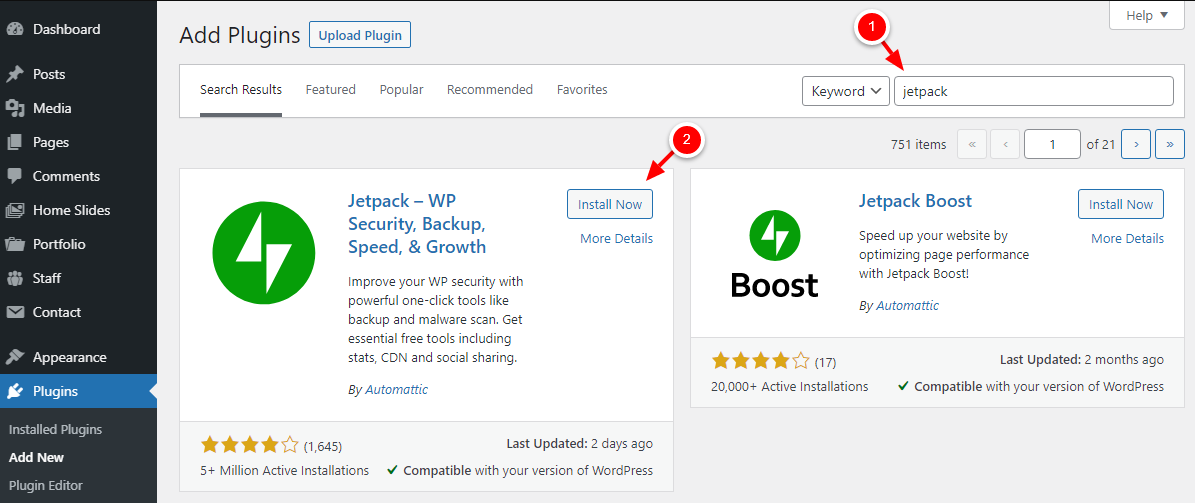
Install Jetpack Publicize. Hit “Plugins” to automatically share WordPress posts and click “Add New”.

On the search box, type “Jetpack” and hit the button “Install Now”.
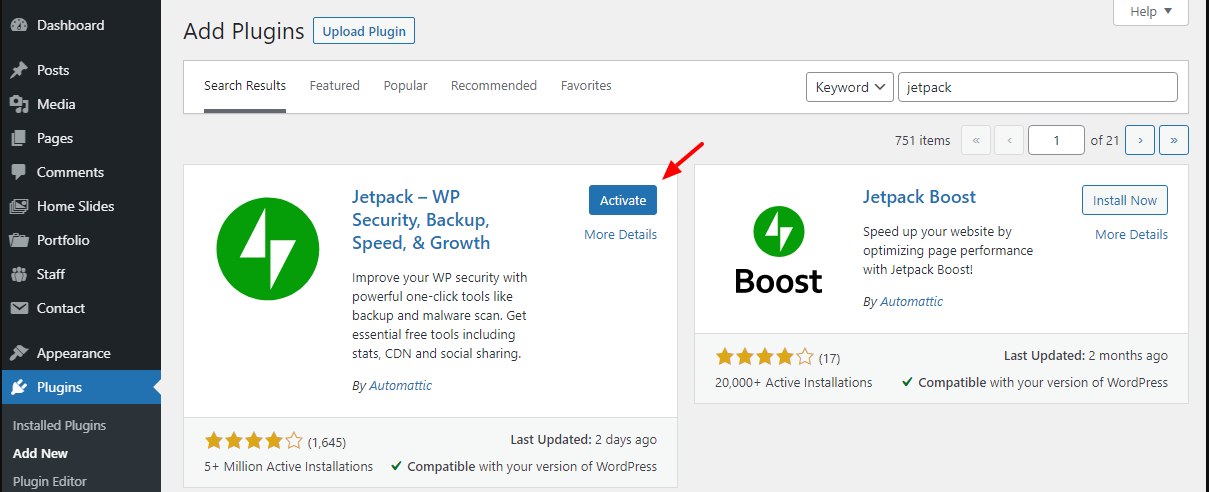
Tap “Activate” to automatically share WordPress posts.
In the next step, you need to hit the button, “Set up Jetpack”.

You will see two options:-
- Continue with Google
- Continue with WordPress.com
Choose as per your requirement.
Once you connect Jetpack to an account of your choice, you will be taken to the pricing page of Jetpack. Scroll down and tap the option “Start for Free”.

Hit “Sharing” to automatically share WordPress posts.

Next, hit the toggle “Automatically share your posts to social networks”. Next, hit “Connect your social media accounts”.
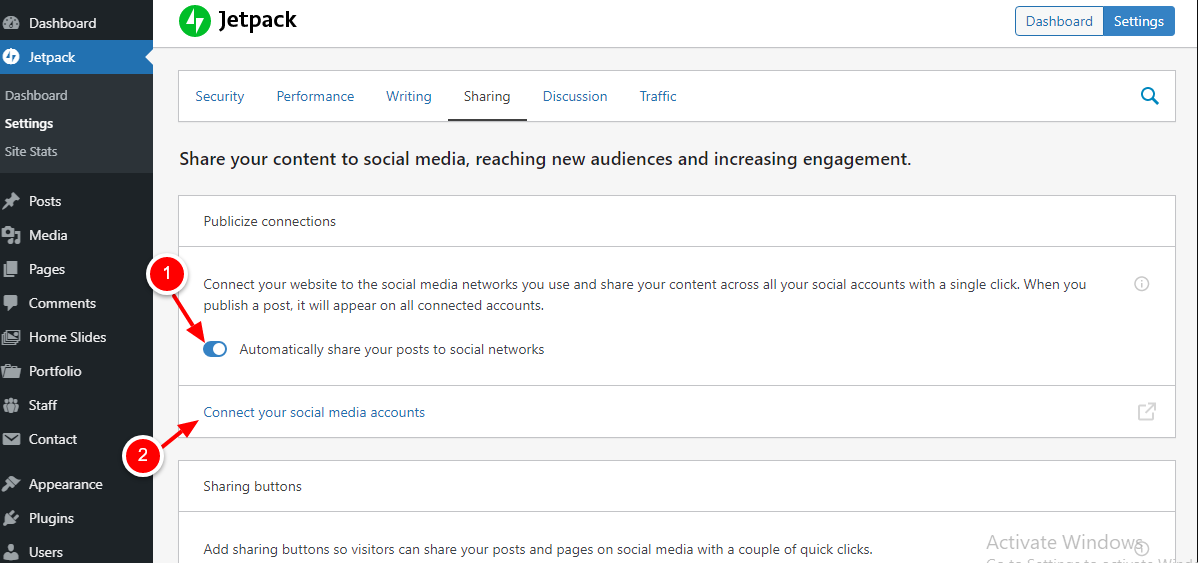
In the next screen, connect the social media account. Please go through the image below for your reference.
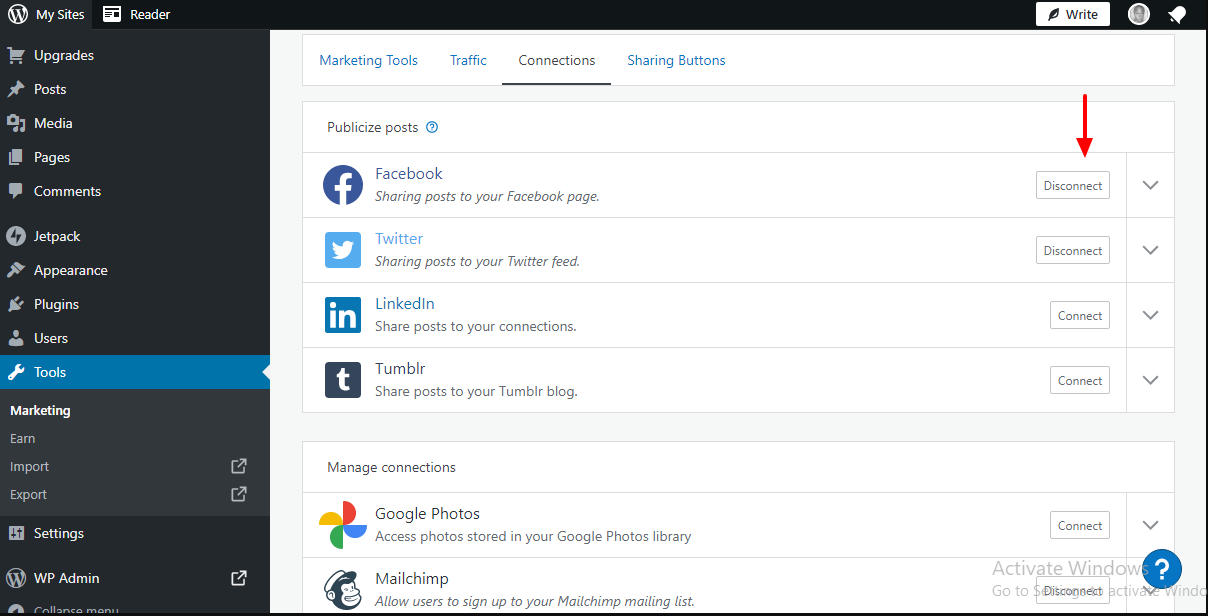
This is a straightforward process. In case you are having any trouble, just get in touch with a good WordPress support team. Their developers would be adept in social media auto publish and employing WordPress plugins.
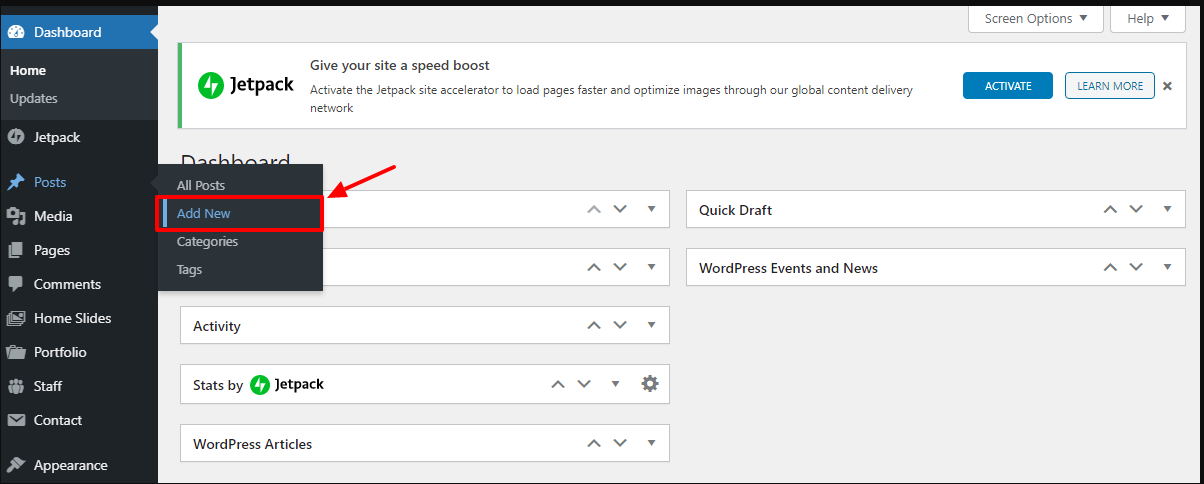
When done, head back to the WP admin dashboard and craft a dummy post.
You will see the option of Jetpack Publicize under the “Publish” tab.
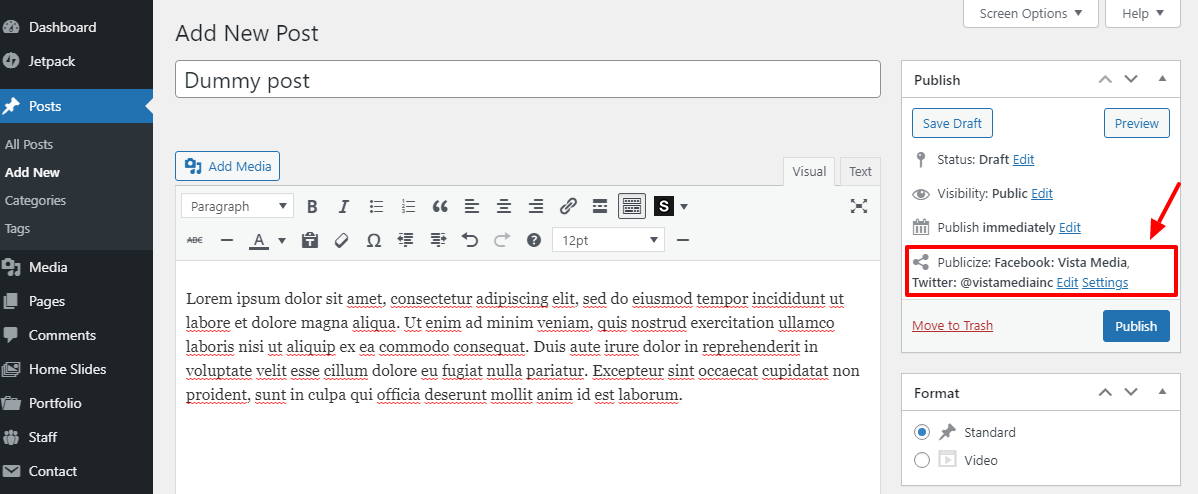
As soon as you publish the posts, Jetpack will automatically share WordPress posts. This auto-post WordPress plugin can only handle five social media sites at a time. If you want more, try NextScripts.
- NextScripts
This is another brilliant plugin to automatically share WordPress posts. You can share your WordPress posts to over 30 social media platforms instantly.
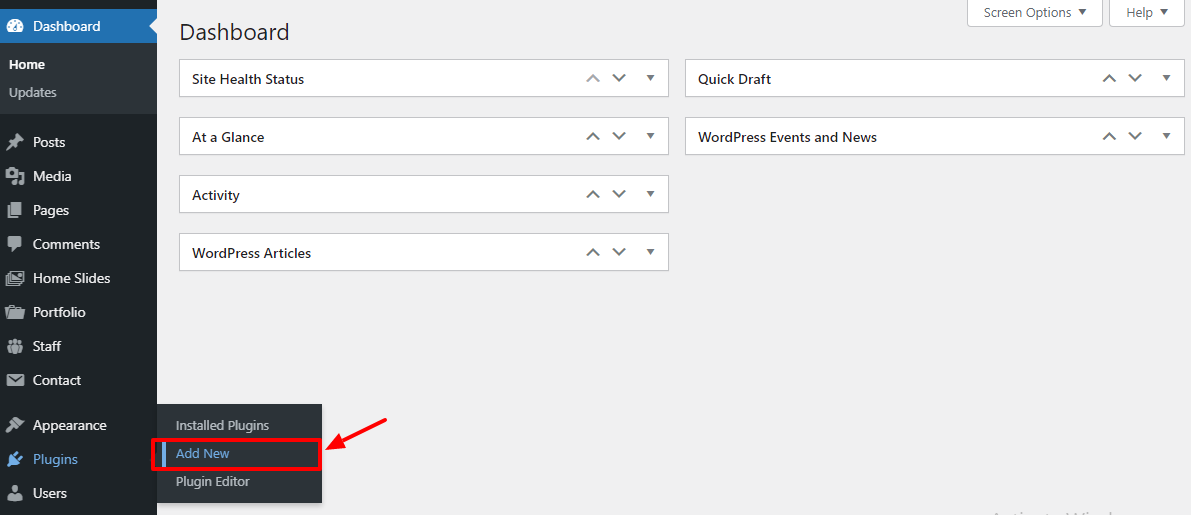
To install NextScripts, log in to the WP admin dashboard. Go to “Plugins” to automatically share WordPress posts. Hit “Add New”
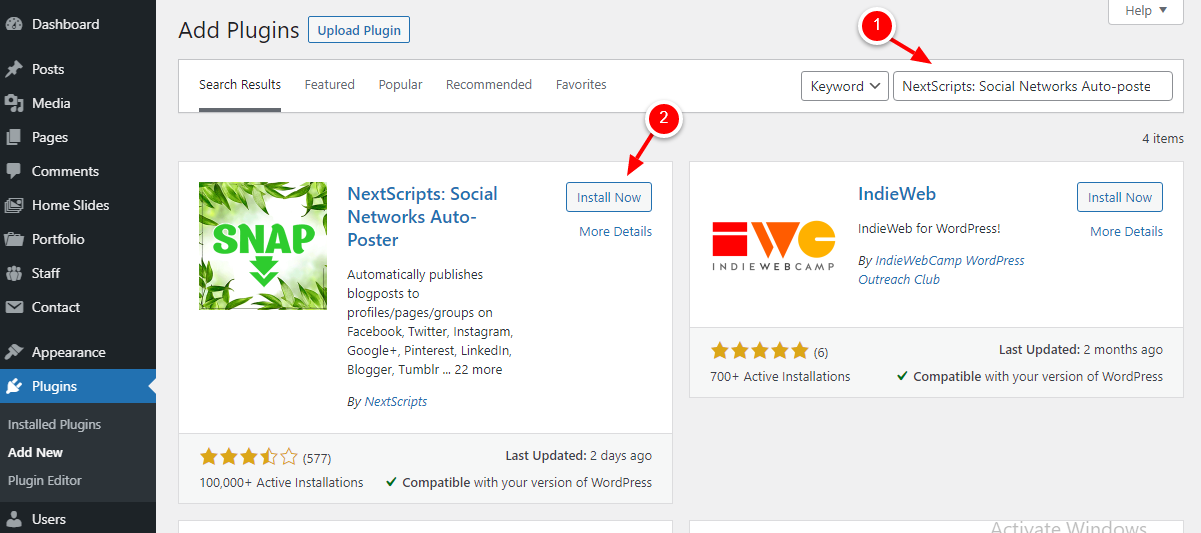
Type “NextScripts: Social Networks Auto-Poster” in the search box. Next, hit “Install Now” to automatically share WordPress posts.
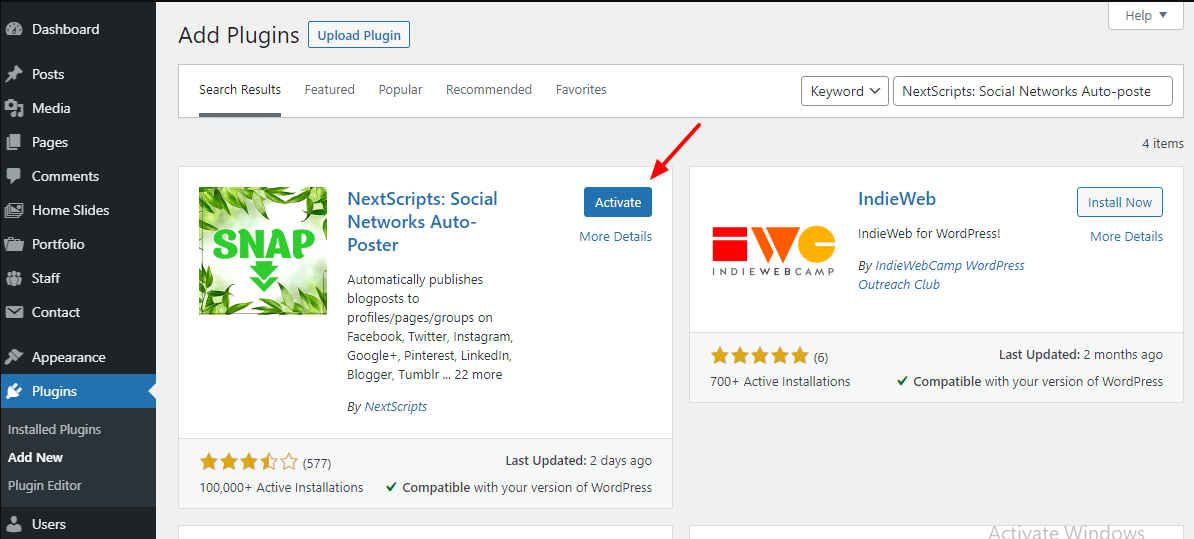
Press “Activate”.
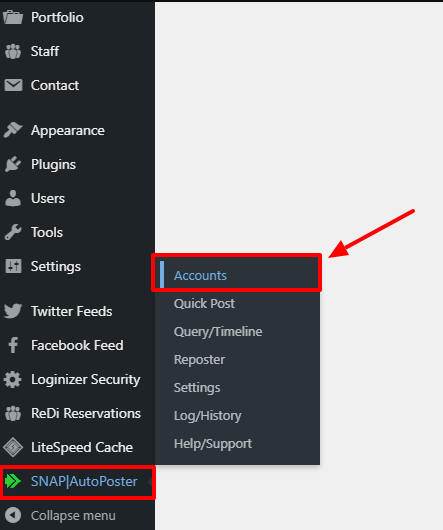
Upon activation of the plugin head to “SNAP AutoPoster”. Hit “Accounts” to automatically share WordPress posts.
Click “Add New”.
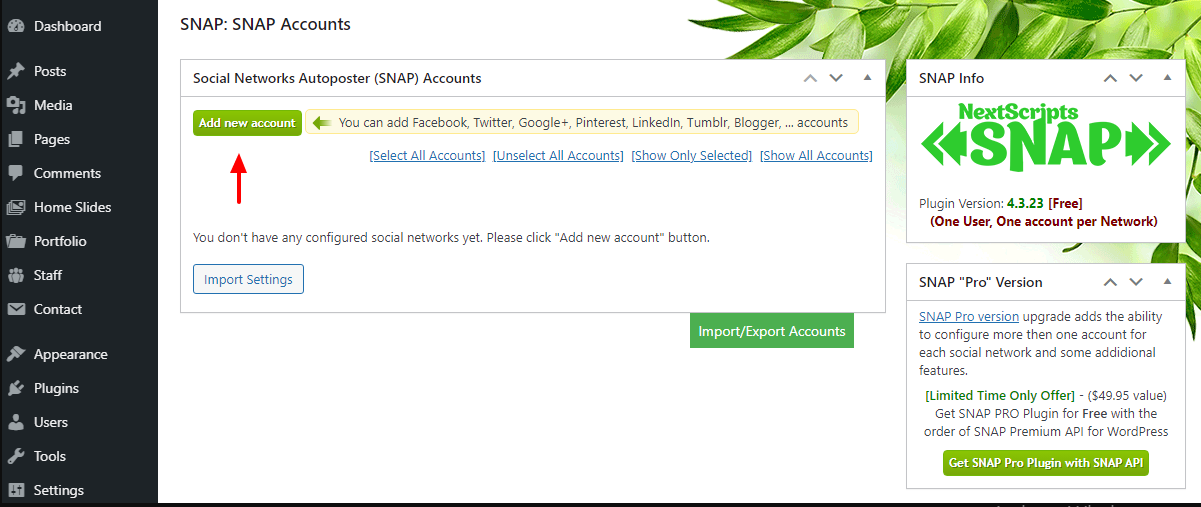
Choose the social media platforms that you wish to configure.

You are done!!
WP Video Tutorial is a leading WordPress and WooCommerce support service provider with well-embellished professionals. Hire our experts and get the right support for your brand instantly.